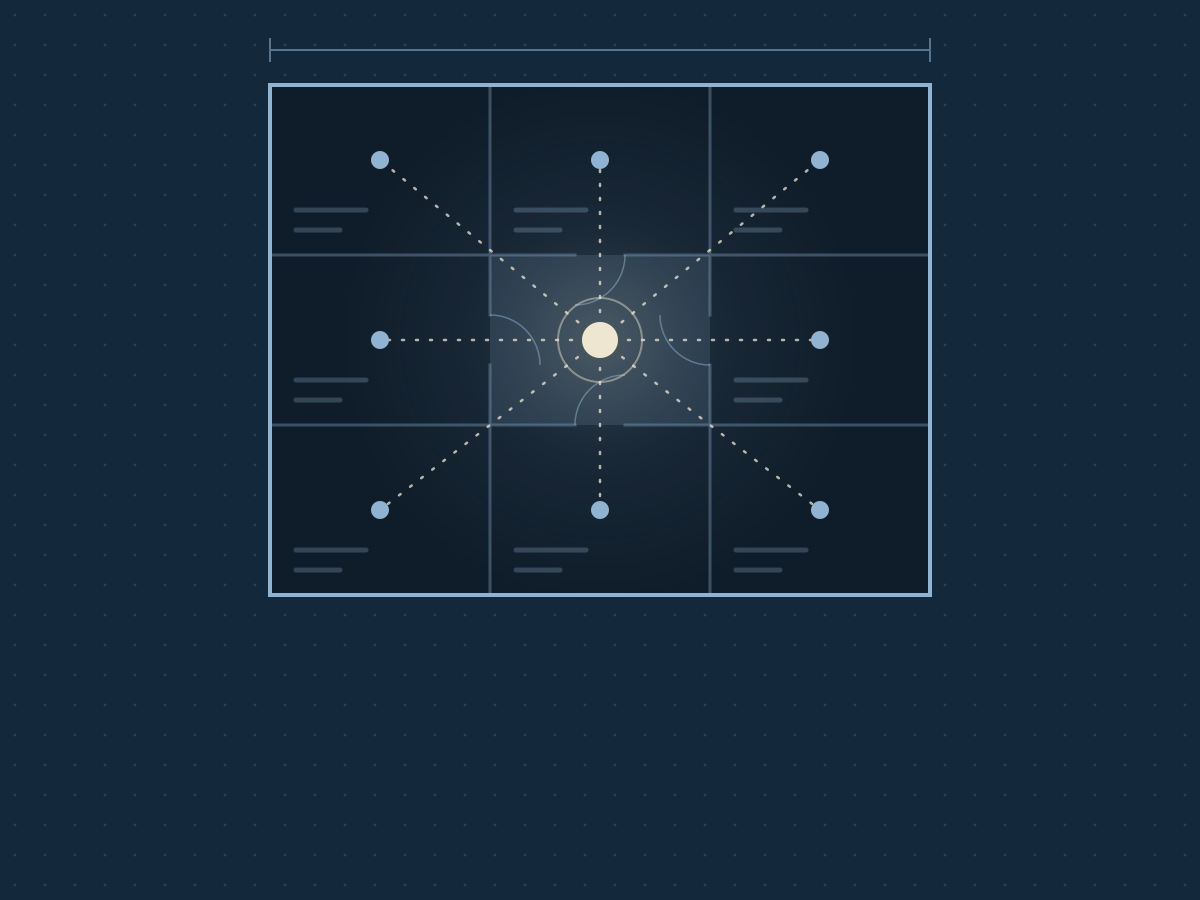

You are the glue between your tools. We put all our business knowledge in one place and let an AI do the work. How it works, what it costs per month, where your data goes and what isn't finished yet.
I love to build. Houses, apps, automations. But the best thing I’ve built lately isn’t an app. It’s the way Chris and I run InnerSeed.
There are two of us. We have a website, apps, a newsletter, a few social media channels and a set of accounts. That sounds like work for a team. Now it’s work for two people and an AI that works alongside us.
In this blog you’ll read how that works, what it costs per month, where your data ends up and what isn’t finished yet. Because if you connect this to your business, you want to know what you’re getting into.
You are the glue between your tools
Take a look at your own week. You have email and a calendar. Something for people to book appointments. Something for payments. Accounting software. A newsletter. Canva for your posts. Maybe a course platform too.
Each tool on its own is fine. The problem sits in between. Who puts the text from your site into your newsletter? Who changes a new price in three places? Who remembers that one client asked something last week?
You do. You are the glue. And all of that lives in your head, next to everything else.
Growing doesn’t make that easier. A colleague or a freelancer joins, and everyone gets their own tool and their own piece of knowledge. And when someone leaves, that knowledge walks out the door with them. That’s how walls appear, even in a business of three people.
One folder with everything your business knows
With us, everything our business knows sits in one folder. Who we are, what we offer, what it costs, how we sound, what we’ve decided and what needs doing this week.
They’re plain text files. You can open them in Notepad. No database, no system you have to learn.
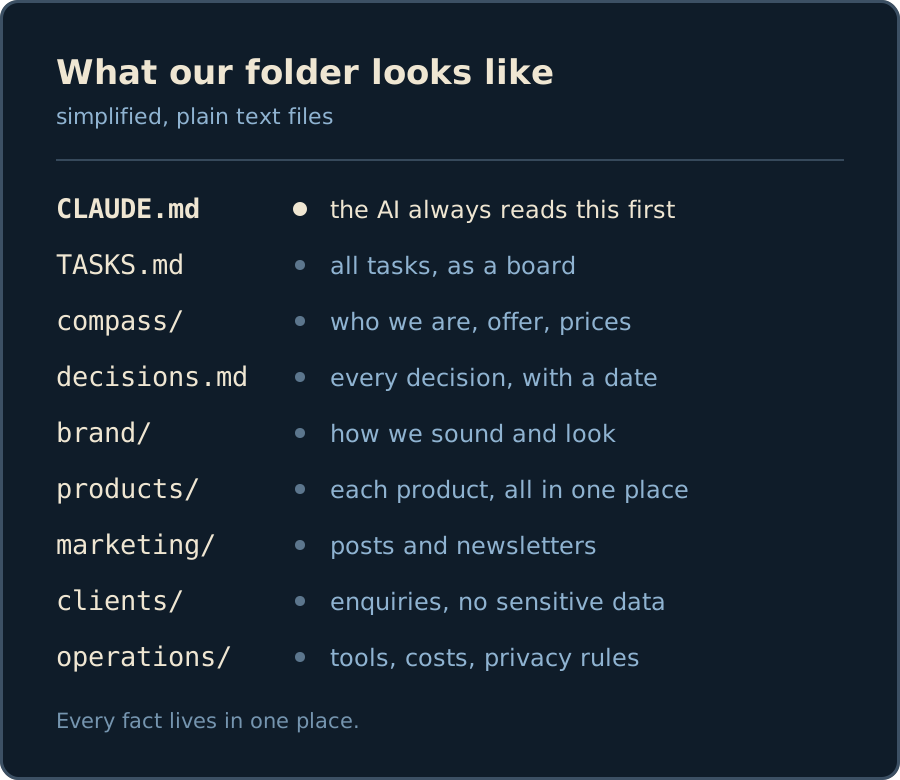 Our folder, simplified. Every fact lives in one place.
There’s one rule everything turns on: every fact lives in one place. A price is in one file. A decision is in the decisions file, with a date. That way an old price can never linger in some corner.
An AI assistant reads that folder and works from there. A post, an email, a text on the site or a video: it all comes from the same source. That’s why everything sounds like us, even when we’re busy.
It also means Chris and I need to catch each other up less. Whatever one of us decides is in the folder. The other one, and the AI, then know it too.
How the AI knows where to look
At the top of the folder there’s one file the AI always reads first. It holds the business in five lines, a table of contents for the folder and our fixed rules. After that, it only opens the files it needs for the task at hand.
If I ask for a post about Garden, it reads how we sound and what’s been settled about Garden. It leaves the accounts alone.
A folder with a memory
Every change to our folder is saved: what changed, who changed it and when. If something goes wrong, we undo it in one step. A bit like “track changes” in Word, but for your whole business.
We do that with GitHub, a place where programmers keep their code. That suits us, because our apps live there too. You don’t need to learn it. A folder in OneDrive or Google Drive also keeps old versions, and for most business owners that’s enough. Do make sure it’s a business account. More on that further down.
What that looks like in an ordinary week
A post. I ask for a LinkedIn post about something I built. It comes back in our voice, with the right price and without words we never use. I read it, polish it here and there, and get it ready.
A video. The share images and short videos you see from us, we make with Remotion. That’s video in code. I don’t write that code myself. I say what I want to see, the AI builds it and I check whether it’s right.
 Made with Remotion: the switch between our two worlds.
A spoken idea. Chris or I record an idea on the go and put it in our Drive. My laptop types it out, on the laptop itself. Nothing goes to a transcription service. Then it becomes a post, a blog or a task.
A price that changes. The AI looks up where else the price appears (the site, an app, an email) and proposes the changes. We check them before anything goes live.
A text on the site. If we want a different sentence on the homepage, we simply ask. The AI changes the website, we check it, and only then do we put it live.
This blog came about the same way. I gave the direction and the facts, the AI helped write it, and I read everything through.
The AI doesn’t send anything by itself
“And what if it sends something wrong out the door?” That’s why, with us, it doesn’t send anything by itself. Every email, post or change is a draft first. You press send.
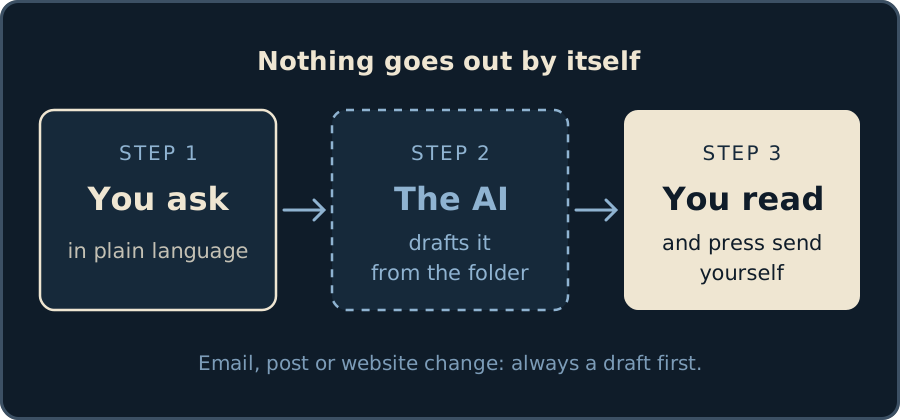 Nothing goes out the door by itself.
The folder also holds fixed rules the AI always follows. For us, for example: no medical claims, no passwords in files, and every decision in one fixed place. Passwords and keys live in a password manager, not in the folder. And we’ve locked the AI out of the files on our laptop that hold keys.
An AI is fast and good, but not infallible. It can misread a fact or say something too firmly. That’s why you read along. It’s a hard worker that knows your business well, not a replacement for your judgement.
Where your data ends up
This is the question coaches and business owners ask first. Rightly so. So here’s the whole story, including the less pretty side.
The folder is on your own computer, but not only there. A copy lives in the cloud where you keep it (GitHub for us, maybe OneDrive for you). And the moment the AI reads a file, that text goes to the AI service. For Claude, the AI we use, that’s Anthropic. They store data in the United States.
That’s why client data stays out of the folder. Health data, client files, what someone shared in a session: none of that is in there. That’s a fixed rule in the folder itself, so the AI knows it too.
We work with three colours.
| Colour | Example | To the AI? |
|---|---|---|
| Green | your own texts, offer, plans | yes |
| Orange | a name, an email address, an ordinary client question | only on a business plan with a data processing agreement, and only what’s needed |
| Red | health, what someone shared in a session | never |
For each tool, we know where the data lives. Plunk, our newsletter, stores everything in Germany. Our apps run in Ireland. Cal.com, for appointments, is in the United States. That’s fine, as long as you know it and consciously choose what you put in.
The data processing agreement. You need one with every party that stores personal data on your behalf. Free and consumer plans often don’t include one. That’s the real reason to choose a business plan for client work. We keep track, tool by tool, of whether that agreement is in place.
So is this “GDPR-proof”? We don’t use that word, because nobody can promise it. What you can do: know what is stored where, and why. A lawyer is reviewing our arrangements. That’s where it starts.
What it costs per month
The question almost nobody answers honestly. So here are the amounts, as they are now. All excluding VAT.
The AI. Claude Pro costs $20 a month. That’s enough to work with the folder. For client data you need the Team plan, which comes with a data processing agreement. That’s $25 per person per month, for at least two people. Working on your own? Then you also pay for that second seat: $50 a month in total.
The folder. GitHub is free. OneDrive comes with Microsoft 365, which many business owners already have.
The tools around it. Many have a free plan for small businesses. Plunk for your newsletter up to a thousand emails a month. Cal.com for appointments if you work on your own. Remotion for videos at a company of up to three people.
| Situation | Tools per month |
|---|---|
| You only work with your own texts and plans | about $20 |
| You also let the AI prepare client emails and quotes | about $50 |
| You want your own app for your clients | add hosting and maintenance, which we quote per app |
Setting it up. We do that together with you: an intake, filling the folder with your offer, voice and tasks, the fixed routines, up to three connections and a handover. That’s €795, one-off. If you then want a fixed moment each month to keep up, with one change or new routine, that’s €95 a month. Fixed for the first three months, then cancel monthly.
So for a coach working on their own: around €115 a month after setup. Rather do it yourself? That’s fine too. The folder is no secret.
The folder is yours
“Am I then stuck with one AI?” No. The folder consists of plain text files. You can open them, read them and take them with you.
We work with Claude now. If something better comes along tomorrow, or an AI on your own laptop works just as well? Then you take the folder with you. At most you rename the start file.
The same goes for your apps. The code lives in your own storage, and so does the data. We use standard technology, so another builder can take it over. To be fair, that is work: you don’t move an app in an afternoon. But you’re not locked in.
And the knowledge stays in your business. If someone leaves, what they knew is still right there in the folder. If someone joins, the folder is the first thing they read.
If something goes down
The AI is down? Your folder is still there. You read it yourself and work by hand for a day. Annoying, not a disaster.
A payment service is down? We have a second payment route ready to switch on.
A tool shuts down? You take your data out and pick another one. That’s exactly why we choose tools you can get your data out of.
What isn’t finished yet: an alert that warns us when an app is down. Right now we notice it ourselves or hear it from a user. We’ll add that before we take on apps for clients.
What you keep and what you replace
You don’t have to throw everything out. We look at each tool: does it work, and does it talk to the rest? Then it stays. Is it expensive and is your data locked inside it? Then we look for an alternative that can be connected.
For us, ActiveCampaign made way for Plunk, Canva mostly for Remotion, and Shopify for our own website. Microsoft 365, Cal.com, Mollie and Moneybird stayed, because they work and can be connected.
That often saves money. But more importantly: every tool you replace is one wall fewer.
Start small
You don’t have to turn everything upside down at once. First your offer and your voice go into the folder. Then one connection, your newsletter for example. That way something gets added each time.
So it doesn’t have to be finished before it’s useful to you.
So why our own apps after all?
A folder with an AI takes care of your work behind the scenes. But your clients don’t see that folder. For them, we build apps.
We give breathwork sessions ourselves, so we had the same questions as the coaches we build for: where does someone book, how do they pay, where is the audio, who sees which data? No single tool did that the way we wanted. So we built it.
InnerSeed Reconnect is Chris’s five-day programme (in Dutch). Everything a coach needs to sell a programme online is in one app:
- a sales page with a day-by-day overview, frequently asked questions and reviews from participants
- payment with iDEAL through Mollie, including the withdrawal waiver that European buyers are required to see
- straight in after payment, without creating an account
- logging in with a code by email, so no password to forget
- five days of audio, PDFs and text, and a request for a review at the end
- the coach chooses which reviews go on the page, and can invite people for free
- participants delete their own account, with one button
- it works as an app on your phone, without an app store
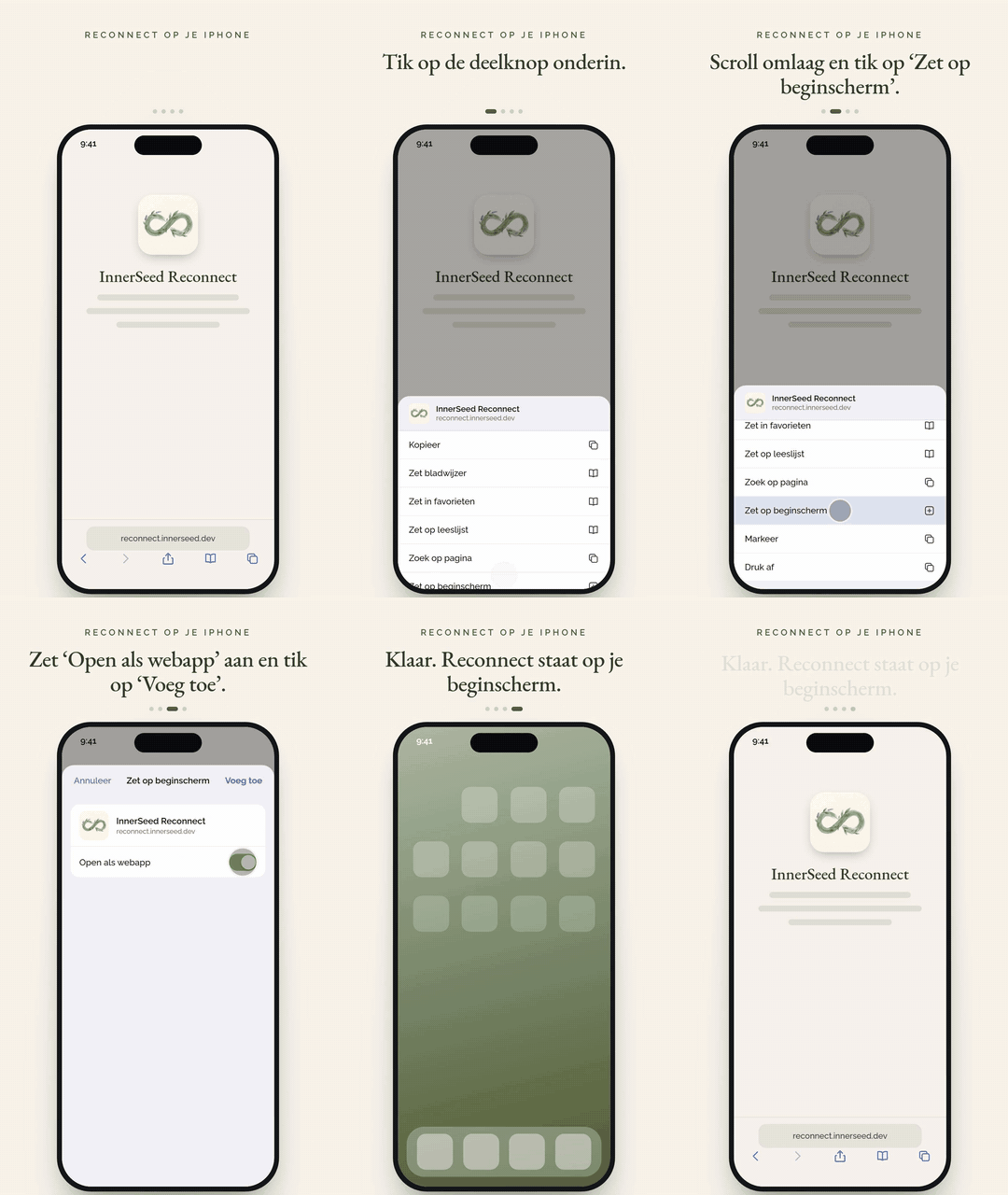 How a participant puts Reconnect on their home screen as an app, without an app store. We made this explainer with Remotion too.
InnerSeed Garden is a breathwork app for at home, with a subscription (in Dutch). A coach or facilitator creates their own sessions for it: music, breath guidance and voice in one mix. Garden goes live soon, and is also for sale as an app for your own practice.
Some things you only learn by building and using it yourself. Take audio that has to keep playing when an iPhone locks. Sounds like a detail, until someone is lying in the middle of a breathwork session and it suddenly goes quiet. We ran into that ourselves. If we build for you, you get that lesson thrown in for free.
Who it’s not for
Do you work with one tool and does everything run smoothly? Then you don’t need this.
Do you want everything to happen by itself, without you ever looking? Then not either. We believe in an AI that does the work and a person who says yes or no.
And are you looking for an agency with a helpdesk that picks up 24 hours a day? Then we’re not the right fit. There are two of us, and we’d rather say so now than later.
Questions we often get
Do I need to be able to code? No. You work in plain language. “Make a newsletter about next month’s workshop” is a perfectly good request.
Does the AI learn from my data? Not on Claude’s business plans: Anthropic doesn’t train on your conversations there. Check this for every AI tool you use, because it differs per plan.
Who owns what the AI makes? Anthropic claims no rights to what you make with Claude. So you use texts, code and images however you like. And the code of an app we build for you lives in your own storage.
What if you stop? Then you still have your folder, your code and your data. Everything sits in your own accounts, not ours.
How many clients do you have? We run our own business on it every day. For other business owners, we’re now looking for the first clients. If you’re one of them, you get a lower setup price in exchange for your honest experience.
Curious?
Book a thirty-minute intro call. Most of all, I want to hear where things pinch for you. Within two days you get a one-page proposal, with one price. If it’s not a fit, I’ll tell you that too.
I work between the Netherlands and Portugal, so we get to know each other online, or in person when I’m in the Netherlands.